
Chibi Avatar Maker
Create cute chibi avatar icons online in seconds. Free, simple, and no login required.
Click the START button below to get started!
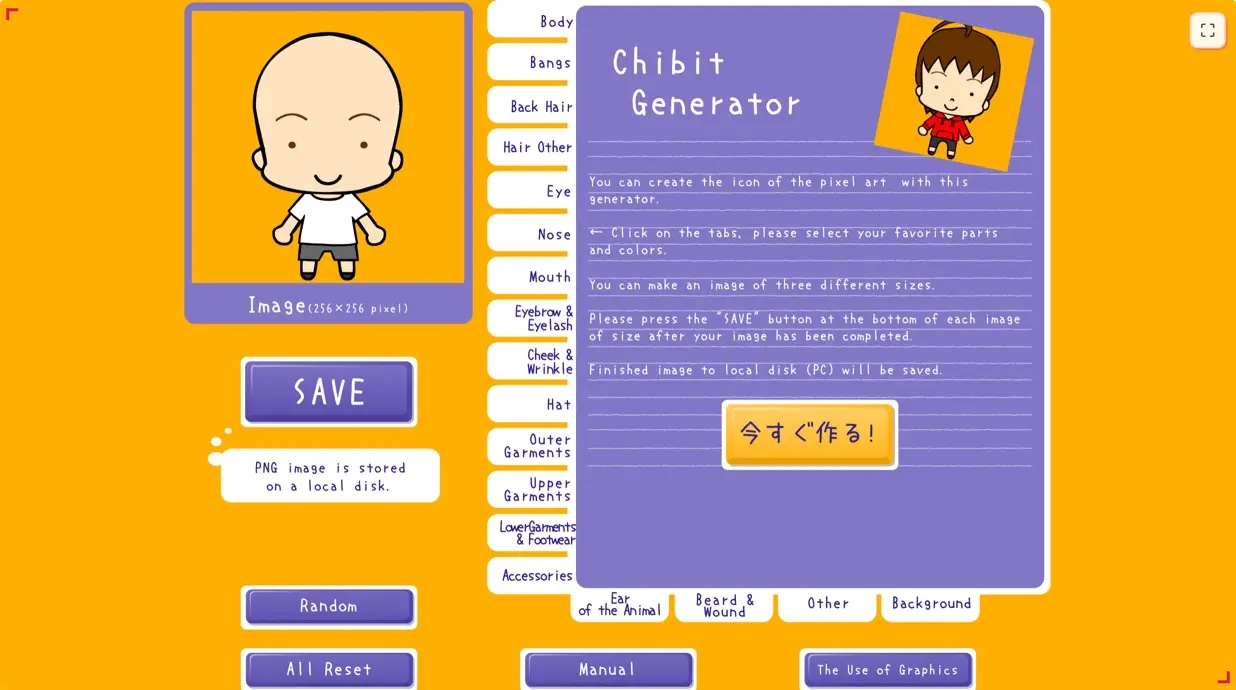
Tip: click and drag inside the canvas to customize your chibi avatar.
One maker. Endless personalities.
These avatars were created with Chibi Avatar Maker. Yours could be next.


How to Make a Chibi Avatar
Four simple steps to create your own cute chibi avatar icon:
Open the Generator
The cute chibi avatar canvas appears as soon as the page loads — ready to play.
Customize Your Face
Click and drag to adjust the face, expression, and colors until it feels just right.
Download Your Icon
When you're happy, save it instantly and use it as an avatar, sticker, or profile picture.
Share Your Chibi Avatar
Upload and show off your own chibi avatar icon to friends — sharing is coming soon.
Why Use Chibi Avatar Maker?
Simple, cute, and zero-friction — made for anyone who loves chibi avatars.
Simple & Fun
Like a mini game — make a cute chibi avatar in just a few clicks.
Free to Use
No hidden fees, no paywalls. Create as many chibi avatars as you want.
Instant Download
Save your design in one click and use it as an avatar, sticker, or profile picture.
Social Media Profiles
Stand out on Twitter, Discord, Instagram, and more with a unique cute avatar.
Game Development
Quickly generate pixel-style or cartoon avatars, NPC expressions, and icon assets.
Creative Projects
Perfect for blogs, portfolios, journals, and sticker sets that need a touch of charm.
What Is the Chibit Generator?
The Chibit Generator is a free browser-based tool for creating a cute compact character portrait with an oversized expression, simplified proportions, and playful decorative details. Instead of drawing every element by hand, you can explore character bases, skin tones, lively hairstyles, large eyes, small mouths, outfits, and whimsical accessories and combine them into an original chibit character icon. The controls encourage experimentation: one change can make the same base character look friendly, serious, playful, mysterious, or completely unexpected.
People sometimes search for “icon generator chibit” when they want this specific compact character style; the tool provides that workflow directly in the browser. That focused approach keeps decisions manageable. You can establish the silhouette first, compare expressions, coordinate colors, and then add an accessory that communicates a hobby or mood. The result is more personal than a generic stock icon and more consistent than trying to assemble unrelated graphics from several sources.
Focused chibit character icon design
Every option supports the same visual language, so hair, expressions, colors, and accessories feel like parts of one coherent chibit character icon rather than unrelated clip art.
Fast browser workflow
Open the tool and start comparing combinations immediately. The Chibit Generator removes software setup and keeps the creative loop short enough for quick experiments.
No account required
You do not need to create a profile before exploring the controls. That makes the chibit icon generator convenient for one-off icons, workshops, and shared devices.
Ready for many uses
A finished chibit character icon can support social profiles, community identities, prototypes, and creative projects. Always preview the image in its final context before publishing.
How to Create an Icon with the Chibit Generator
Use this four-step workflow to turn the first random combination into a deliberate chibit character icon. You can revisit any choice, so treat the process as a series of quick comparisons rather than a decision you must get right on the first attempt.
- 1
Start with the silhouette and purpose
Open the Chibit Generator and decide where the image will appear. A chat profile, game portrait, channel icon, and sticker may need different levels of contrast. Begin with the base and broad shapes before judging small details. Let the eyes and hairstyle carry the design, then choose one or two accessories that support the character instead of competing with the expression.
- 2
Build a readable expression
Move through the available categories and compare character bases, skin tones, lively hairstyles, large eyes, small mouths, outfits, and whimsical accessories. Choose the eyes and mouth together because their relationship defines the mood. Pause after each major change and look at the whole face instead of selecting every detail only because it is interesting on its own.
- 3
Refine color and character details
Use color choices to connect the separate parts into one character. Use a focused palette with a dominant hair or outfit color and a smaller accent color so the cute details remain organized. Add accessories last, and keep only the details that improve recognition, communicate personality, or support the intended theme. A simpler combination often reads better in a small icon.
- 4
Preview, save, and test the icon
Check the character at profile size before downloading and remove visual competition around the eyes if the expression becomes hard to read. When the design is ready, use the generator's save control to download it. Place the image in a temporary profile or mockup and check the crop, background contrast, and overall mood before adopting it everywhere.
Where to Use Your Chibit Character Icon
Discord and community profiles
Use the chibit character icon as a recognizable member identity. Strong contrast and one memorable feature help it remain distinct beside many other tiny avatars.
YouTube and streaming channels
A custom icon can connect channel art, chat identity, and thumbnails. Repeat one or two colors so the character feels related to the rest of the channel.
Social media accounts
Test the image inside a circular crop before publishing. Keep the face centered and avoid relying on edge details that a platform may remove.
Games and prototypes
Use generated characters as visual placeholders for player slots, NPC lists, dialogue tests, or internal demos while the final art direction is still evolving.
Teams and group activities
Create a coordinated set by keeping the base palette consistent and changing expressions or accessories. This makes each participant individual without losing the group connection.
Stickers and creative projects
Try the icon in labels, digital stickers, lesson materials, mood boards, or personal craft layouts. Confirm resolution and usage requirements before producing physical items.
Design Tips for a Better Chibit Character Icon
- Design for the final size: A detail that looks attractive while enlarged may disappear in a profile thumbnail. Zoom out regularly and protect the main silhouette, eyes, and mouth.
- Give every color a job: Use one dominant color, a supporting color, and a smaller accent. Repeating those choices across separate parts makes the chibit character icon feel intentional.
- Prioritize expression: Compare several eye-and-mouth pairs before adding decoration. Viewers read the emotional signal first, so accessories should reinforce rather than obscure it.
- Control visual density: Leave quiet areas around detailed hair, patterns, or accessories. If every region is equally busy, the character loses a clear focal point.
- Check different backgrounds: Preview the icon against light, dark, and colorful surfaces. Adjust the outer colors when the silhouette blends into the environment where it will be used.
- Create useful variations: Save a few purposeful alternatives with different expressions or accent colors. A small set gives you options for seasonal profiles, project roles, or changing moods.
Ready to create a new chibit character icon? Return to the Chibit Generator, compare a few combinations, and turn the strongest idea into an icon you can recognize at a glance.
Frequently Asked Questions
Have another question? Reach out and we'll be happy to help.
Make Your Own Chibi Avatar Now
Free, fast, and no sign up — create your cute chibi avatar icon today.